
OBDSTAR ECU MASTER is a professional ECU MASTER bench programming and cloning platform designed for passenger and commercial vehicles.
This FAQ helps users quickly understand the most common questions about ECU cloning support, activation, subscriptions, power requirements, system compatibility, and software setup.
Q1: What is the difference between ECU MASTER and DP PAD3?
For passenger vehicle ECU cloning, both tools currently provide similar functions.
The main difference is commercial vehicle support:
- ECU MASTER → Supports commercial vehicle ECU cloning
- DP PAD3 → Currently does not support it
This makes ECU MASTER more suitable for workshops handling both passenger and commercial ECU work.
Q2: Does ECU MASTER require a yearly subscription?
Software update policies are one of the most common concerns for new users.
Yes. ECU MASTER includes 12 months of free updates after activation.
Renewing before expiration usually provides discounted renewal pricing.
Q3: Will the tool stop working after subscription expiration?
No.
Subscription expiration only affects:
- Software updates
- New downloads
- Newly released functions
Previously downloaded software will continue working normally.
Q4: Does ECU MASTER need an external power supply?
Yes, especially during ECU bench programming and cloning procedures.
A professional adjustable regulated power supply is recommended to maintain stable ECU communication.
Maximum supported input:
26V / 5A
Always follow the voltage requirements shown inside the software.
Q5: Which operating systems are supported?
ECU MASTER currently supports:
- Windows 10
- Windows 11
Older operating systems are not officially recommended.
Q6: How do I download and activate ECU MASTER?
Download the Software
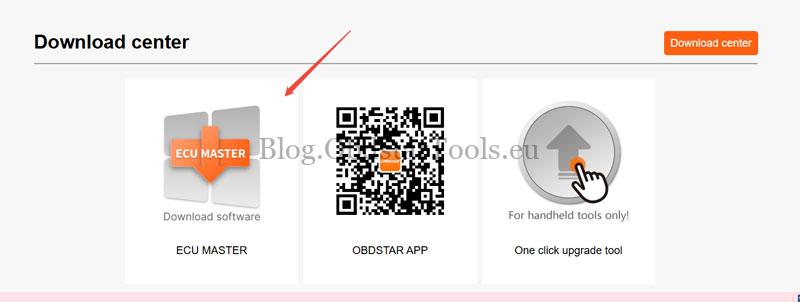
Download the ECU MASTER software from the official OBDSTAR website:
Path: Download Center → ECU MASTER
Activation Steps
- Connect ECU MASTER to the PC using a Type-B cable
- Open the software
- Enter Personal Center
- Complete User Registration
- Device activation completes automatically
- Run One-Key Upgrade to download all software packages
Q7. Who is ECU MASTER best for?
Obdstar ECUMaster is mainly designed for:
- ECU cloning workshops
- ECU bench programming
- Commercial vehicle ECU work
- Professional bench operations
- Users wanting integrated PC-based workflows
Compared with many standalone tools, ECU MASTER focuses more on stable workshop-based ECU operations and integrated hardware workflows.
Read also
OBDSTAR ECU Master vs DC706 Which Is Better for Your Workshop?
OBDSTAR ECU Master vs DC706: Which Is Better for Your Workshop?
Technical Support
Email: sales@obdstartools.eu
WhatsApp/Mobile/Wechat: +86 15972933706
Skype: OBDStarTools.eu