
OBDSTAR iScan Guzzi communication errors on the 2014 Moto Guzzi California are typically caused by a lack of external 12V power or incorrect cable sequencing.
To resolve this, connect the N004 adapter directly to the motorcycle’s 12V battery rather than a wall charger. This ensures the diagnostic line receives the necessary voltage to establish a data link.
Common Error Symptoms
When attempting to diagnose a 2014 Moto Guzzi California, the device may display the following:
- Message: “Communication error, make sure the following conditions are met: ignition switch is turned on; Mainline is connected; Battery has power”.
- Voltage Reading: Measuring the two wires on the motorcycle’s diagnostic plug shows 0V even with the ignition on.
Required Hardware Configuration
To resolve this, ensure your hardware setup follows these specifications:
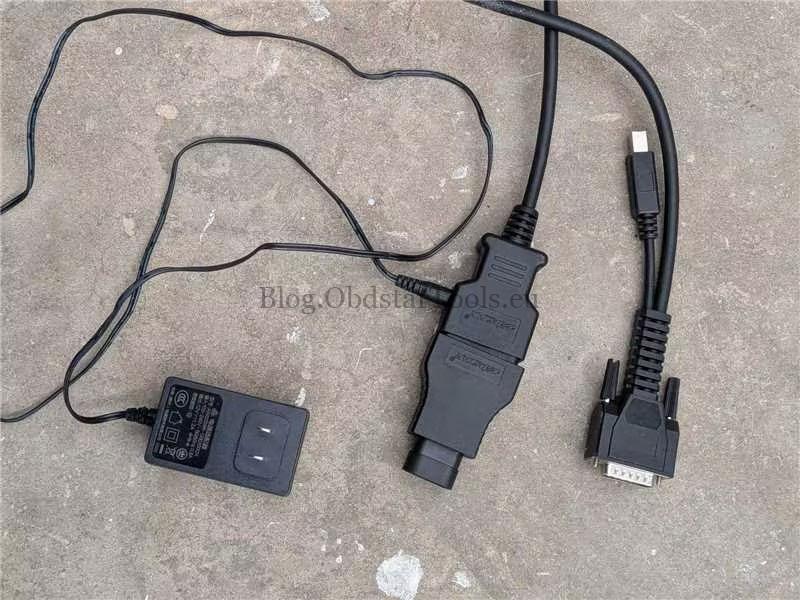
- Adapter: Use the N004 Three-Pin Adapter.
- External Power: This specific model requires external power to facilitate communication.
- Power Source (Critical):
- Do Not Use: 110V wall chargers or standard device chargers plugged into the N004 side port.
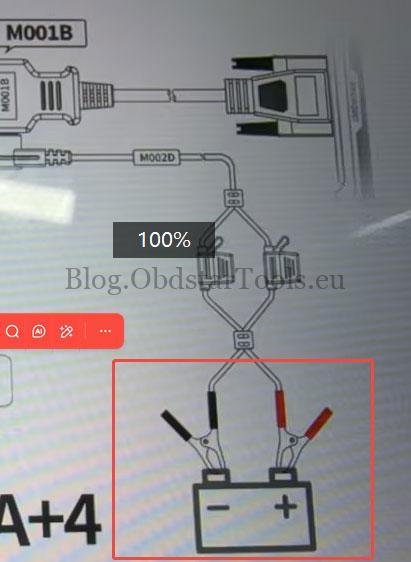
- Do Use: A 12V power cable connected directly to the motorcycle’s battery terminals (positive and negative).
Step-by-Step Connection Guide
- Connect the N004 adapter to the motorcycle’s 3-pin diagnostic socket.
- Attach the power clamps to the 12V motorcycle battery.
- Insert the DC power plug into the side port of the N004 adapter.
- Ensure the ignition switch is in the ON position.
- Launch the OBDSTAR Moto Guzzi software and initiate the diagnostic scan.
Technical Support
- Email: sales@obdstartools.eu
- WhatsApp/Mobile/Wechat: +86 15972933706
- Skype: OBDStarTools.eu
- Website: www.obdstartools.eu