
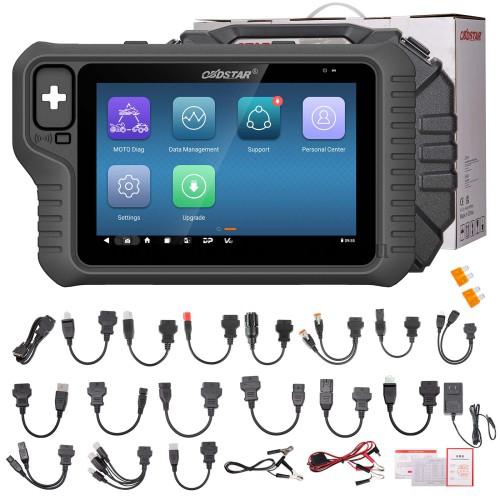
The OBDSTAR MotoMaster is the premier diagnostic solution designed for high-end motorcycles, including Aprilia, Ducati, Piaggio, Vespa, Moto Guzzi, and CFMOTO. To properly use the M004/N004 Cables with these specific brands, a simple external power connection is required to activate the device and begin communication. Here is how to quickly and safely power your scanner for any job.
Essential Gear
Before starting, ensure you have the following:
- Scanner: OBDSTAR MotoMaster
- Main Cable: M001A Main Cable
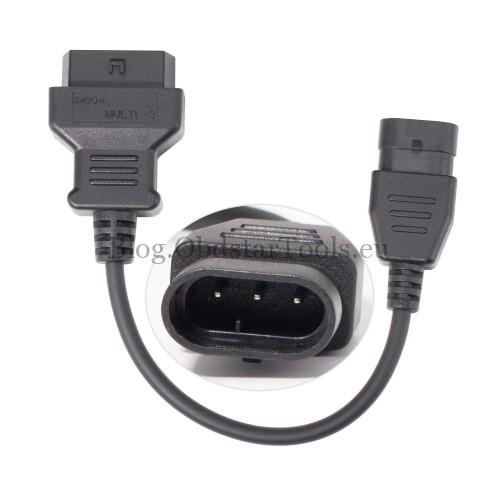
- Diagnostic Cable: M004 Data Cable (or N004)
- Power Connectors: M002 Power Cable & M002A Ground Cable
Quick Setup Guide
Scenario 1: Using the Vehicle Battery
- Connect the MotoMaster, M001A main cable, and M004 cable to the bike.
- Clamp the M002 cable to the vehicle’s positive (+) and negative (-) terminals.
- Plug the 12V connector into the M001A main cable.
- Ensure the power light turns green before starting.
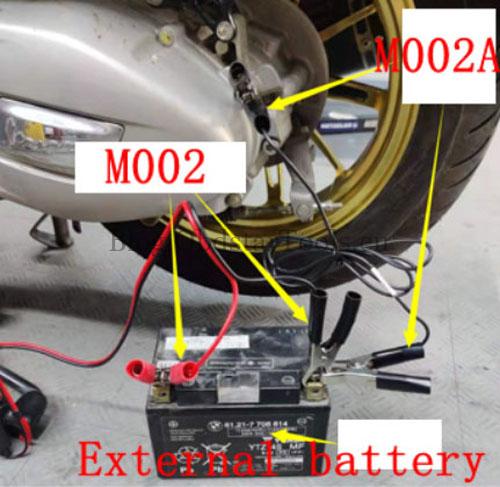
Scenario 2: Using an External Battery
- Connect the MotoMaster and cables to the vehicle diagnostic port.
- Clamp the M002 cable to a healthy external 12V battery.
- Plug the 12V connector into the M001A main cable.
- Crucial Step: Use the M002A ground cable to connect the vehicle’s ground to the external battery’s negative (-) terminal.
- Confirm the indicator light is green.
Troubleshooting
If the device doesn’t power up:
- Check if the M002 cable fuse is blown.
- Verify the battery provides a steady 12V output.
- Ensure your MotoMaster is updated to the latest software version.
Note: Always follow the specific prompts on your OBDSTAR device during operation.
Technical Support
- Email: sales@obdstartools.eu
- WhatsApp/Mobile/Wechat: +86 15972933706
- Skype: OBDStarTools.eu
- Website: www.obdstartools.eu